

Power Bank With Lightning Cable (10,000mAh): Our Top 3 Picks

No extra cords to forget. No digging through bags. Just plug in and charge!
Ever grabbed a power bank, only to realize you packed the wrong cable, or none at all? That small mistake is exactly why so many people now search for a power bank with built-in lightning cable. Fewer loose wires, fewer things to forget, and one less headache when your phone hits 10%.
But once you start comparing models, things get confusing fast. Prices jump, wattage numbers look intimidating, and reviews are split between “super convenient” and “the cable broke.”
This guide breaks it all down using real user experiences and clear spec, so you can decide based on how you actually use your devices, not marketing claims.
In this blog:
- Is a Power Bank With Lightning Cable Still Worth It?
- Main Comparison Table: 10,000mAh Power Bank With Lightning Cable
- Our Top 3 Power Bank with Built-in Lightning Cable Pros and Cons
- Built-In Lightning Cable: Convenient or Risky?
- How to Care for a Power Bank With Lightning Cable
- How to Choose the Right Power Bank With Lightning Cable
- Frequently Asked Questions
Let’s get started!
Is a Power Bank With Lightning Cable Still Worth It?
Despite the concerns, many users still prefer a power bank with lightning cable because:
- It removes friction from everyday charging
- It reduces what you need to pack
- It’s easier to grab during quick trips or emergencies
The key is choosing one that doesn’t rely entirely on that cable to stay useful.
Models like Anker, Belkin, and XYZTech all share important basics:
- 10,000mAh capacity suitable for weekend use
- Airline-friendly
- Ability to charge at least two devices
- Support for Lightning charging without adapters
That means your decision usually comes down to:
- Price
- Charging speed
- Extra features like digital displays or flashlights
- How well does the power bank still work if the cable wears out
Main Comparison Table: 10,000mAh Power Bank With Lightning Cable
Now that we’ve covered why built-in Lightning cables are appealing, and where the concerns usually come from, the next step is seeing how popular 10,000mAh models actually compare side by side.
The table below highlights the features that matter most in daily use: charging speed, built-in cables, weight, and how flexible each power bank remains if the cable wears out
|
Feature |
|||
|
Price |
$49.99 |
$48.99 sale |
$39.99 |
|
Battery Capacity |
10,000mAh |
10,000mAh |
10,000mAh |
|
Built-in Lightning Cable |
Yes |
Yes |
Yes |
|
Built-in USB-C Cable |
Yes |
Yes |
Yes |
|
Max Output Power |
30W |
23W |
30W |
|
Charges Devices At Once |
2 devices |
2 devices |
2–3 devices |
|
Recharging Speed |
~3.5 hours |
Slower with some USB-C chargers |
2–3 hours |
|
Display Type |
Digital screen |
LED dots |
Digital percentage |
|
Extra Features |
AC plug + foldable charger |
Pass-through charging |
Flashlight, temp control |
|
Weight |
250 g |
227 g |
225g |
|
Warranty |
18 months |
2 years + equipment coverage |
Standard certifications |
|
Airline Certifications |
Yes |
Yes |
Yes |
Quick Takeaway
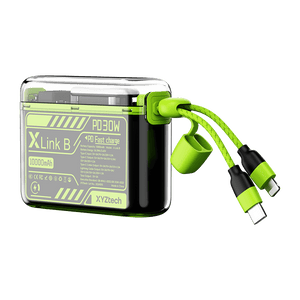
All three power bank with built-in lightning cable will keep your phone alive for a day or weekend. Anker focuses on all-in-one convenience, Belkin leans on brand trust and warranty, while XYZTech delivers similar charging performance at a noticeably lower price with extra practical features.
Our Top 3 Power Bank with Built-in Lightning Cable Pros and Cons
Specs are useful, but they don’t always tell the full story. Real-world experience, both good and bad, shows where each power bank shines and where it falls short.

Pros
- All-in-one design combines power bank, wall charger, and cable
- 30W fast charging handles newer phones quickly
- Dual charging lets you power two devices at once
- Trusted brand with solid customer support reputation
Cons
- More expensive than most 10,000mAh options
- Built-in cable failures reported by long-term users
- Heavier than simpler power banks
Best For: People who want a premium, compact setup for daily carry and like the idea of one device replacing both charger and power bank.

Pros
- Integrated Lightning and USB-C cables reduce clutter
- Pass-through charging lets the bank and phone charge together
- Long warranty and connected equipment coverage
- Reliable power output for everyday phone use
Cons
- Higher price for slower charging speeds
- Confusing behavior with modern USB-C chargers
- Short built-in cables limit how you can hold your phone
- Documentation and setup frustrate some users
Best For: Users who value warranty coverage and brand reputation, and don’t mind learning a few quirks to get consistent charging.

Pros
- 30W output matches faster, more expensive models
- Built-in Lightning and USB-C cables cover most devices
- Digital display shows exact battery percentage
- NTC temperature control helps prevent overheating
- Built-in flashlight adds real-world usefulness
- Lower price with similar everyday performance
Cons
- Short built-in cables may limit comfort while charging
- Some long-term durability concerns were reported
- Not as well-known as Anker or Belkin
Best For: Practical users who want strong charging performance without paying extra for brand premiums, especially for travel or backup use.
Built-In Lightning Cable: Convenient or Risky?
After comparing features and pricing, one question keeps coming up in user discussions: is a built-in Lightning cable actually a smart idea long term? Reviews from users shows a clear pattern.
- The convenience is real. People love not packing cables and having something that’s always ready.
- The risk is also real. Built-in cables can wear out. When they do, users are glad the power bank still has working ports.
What matters most
- Choose a model that still works even if the cable fails
- Avoid rough handling in bags
- Don’t rely on the built-in cable as your only charging option on long trips
How to Care for a Power Bank With Lightning Cable
If you’re going to choose a power bank with lightning cable, a little care goes a long way. These tips come straight from long-term users who managed to keep theirs working longer than average.
-
Avoid Letting the Cable Dangle Freely
When the cable hangs loose inside a bag, it bends in ways it wasn’t designed for.
What helps:
- Store the power bank in a small pouch
- Position it so the cable lies flat
- Avoid tossing it into backpacks with heavy items
- Less movement means less stress on the cable joint.
-
Don’t Pull the Cable From the Tip
Always unplug by holding the connector head, not the wire itself. Repeated pulling from the cable weakens internal wiring faster than most people expect.
This is especially important for Lightning connectors, which already have thinner internal pins.
-
Use the Ports When You Can
Even if your power bank with lightning cable includes a built-in cord, consider using the USB-C port when you’re stationary.
Why this helps:
- Reduces daily wear on the built-in cable
- Keeps it in better condition for travel or emergencies
- Extends the overall usable life of the power bank
Think of the built-in cable as a convenience option, not the default every time.
-
Keep It Out of Extreme Heat and Cold
Temperature affects both batteries and cables.
Cold weather reduces usable capacity. Heat accelerates battery aging and cable degradation. Many experienced campers and travelers estimate usable capacity closer to 60–70% in cold environments, even with high-quality power banks.
If you’re outdoors:
- Keep the power bank inside a jacket or bag
- Avoid leaving it in direct sunlight or a hot car
How to Choose the Right Power Bank With Lightning Cable
Focus on these factors:
- Price vs performance – Similar daily results don’t always require the highest price
- Charging speed – Higher watts mean faster top-ups
- Size and weight – Smaller banks get carried more often
- Cable reliability – Ports matter as much as built-in cables
- Extra features – Displays, flashlights, and safety controls add real value
-
Capacity - From real usage stories:
- Light phone use + airplane mode: 10,000mAh often lasts an entire weekend.
- Photos, videos, hotspot use: 20,000mAh offers more peace of mind.
- Just emergency backup: Even 5,000mAh can be enough.
For Light Users: 5,000mAh Option
If you want something smaller and lighter, the XYZtech X Mobile B Mini Power Bank (5000mAh) is worth considering later. It offers built-in Lightning and USB-C charging, airline approval, and enough power for about one full phone charge.
Frequently Asked Questions
What is lightning input in A power bank?
Lightning input means the power bank itself can be recharged using a Lightning cable, the same one commonly used for iPhones and other Apple devices. This removes the need to carry a separate charging cable just for the power bank, which is convenient for Apple users. In practical use, it simplifies your setup but usually comes with slower recharge speeds compared to USB-C input.
Which is better, type C or lightning?
USB-C generally has the advantage because it supports higher power delivery and faster data transfer across many devices. It’s widely used on phones, tablets, laptops, and accessories, making it easier to share one cable across different gadgets. Lightning still works well within Apple’s ecosystem, but its performance and compatibility are more limited by comparison.
Why would I need a USB-C to Lightning Cable?
A USB-C to Lightning cable allows Apple devices to charge from newer USB-C power sources, such as modern wall chargers and power banks. It also enables faster charging on supported iPhones and accessories compared to older USB-A setups. For many users, it’s the bridge that lets Apple devices work smoothly with today’s USB-C-based charging gear.
So, what’s the Best Power Bank with Lightning Cable For you?
A power bank with lightning cable makes sense if convenience is high on your list. All three 10,000mAh models here can handle everyday phone charging, short trips, and emergency use.
If you want an all-in-one premium design, Anker fits that role. If warranty coverage matters most, Belkin stands out. If you want similar charging performance at a lower cost, with practical extras, XYZTech offers strong value without overcomplicating things.
In short, the best choice isn’t about the biggest brand. It’s about matching your devices, habits, and budget to a power bank that actually gets used.
Related Articles
Power Bank with Built-In Cables: Is It Right for You? Pros and Cons
Best Portable Charger with Built-In Cable: XYZtech vs. Anker Nano
Charging Cable for Power Bank: USB-A vs. USB-C vs. Lightning


