

How to Check iPhone Battery Health: Is Yours Still Good?

Maybe you've noticed that the battery doesn't last as long as it used to, or you're checking a used iPhone before deciding whether it's worth keeping.
The good news is that iPhone has a built-in Battery Health section that shows its Maximum Capacity and, on newer models, additional information such as cycle count.
Here's how to check iPhone battery health, what the percentage actually means, what is a good battery health for iPhone, and what you should do if yours is lower than expected.
In this blog:
- How to Check iPhone Battery Health
- What Does iPhone Battery Health Mean?
- What Is Good Battery Health for iPhone?
- Don't Judge Your Battery by the Percentage Alone
- What Should You Do If Your Battery Health Is Low?
- Can I Improve My iPhone Battery Health?
- When Should You Replace an iPhone Battery?
- Frequently Asked Questions
Let’s get started!
How to Check iPhone Battery Health
To check battery health of iphone takes only a few taps, although the menu differs slightly depending on your iPhone model.
Check battery health of iPhone 15 and later
- Go to: Settings → Battery → Battery Health
Depending on your iPhone and software version, you'll see information such as:
- Maximum Capacity
- Cycle Count
- Manufacture Date
- First Use
- Charging information
- Battery recommendations, if applicable
Apple provides cycle count and additional battery information on iPhone 15 models and later.
Check battery health of iPhone 14 and earlier
- Go to: Settings → Battery → Battery Health & Charging
You'll see Maximum Capacity and information about whether the battery is currently supporting normal peak performance.
You don't need a third-party battery app just to check this basic information.
What Does iPhone Battery Health Mean?
The most important number you'll see is Maximum Capacity. It tells you how much charge the battery can hold compared with when it was new.
For example, if your iPhone shows 90% Maximum Capacity, the battery's estimated maximum capacity is about 90% of what it could hold when new.
That doesn't mean the phone will always last exactly 10% less per charge. Battery life also depends on things such as screen brightness, apps, mobile signal, settings, temperature, and how heavily you use the phone.
So think of Battery Health as a measure of battery capacity, not a prediction of exactly how many hours your iPhone will last.
What Is a Good Battery Health for iPhone?
Apple doesn't label every battery-health percentage as good or bad. As a practical guide, 90% or higher is generally a healthy result for a used battery, while approaching 80% indicates substantially more battery aging. Whether you need a replacement depends on battery life, performance, and any warnings shown on the phone.
As a practical guide:
|
Maximum Capacity |
What it generally means |
|
90–100% |
Generally a strong result with relatively little capacity loss |
|
80–89% |
The battery has aged, but it can still be perfectly usable |
|
Below 80% |
Capacity has declined substantially, so battery service may be worth considering |
These are practical guidelines, not official Apple battery-health grades.
The percentage should be considered alongside how your iPhone actually performs. A battery at 86% may be perfectly adequate for one person but frustrating for someone who needs all-day battery life.
Why does 80% matter?
The 80% figure is important because Apple uses it as a battery-capacity design benchmark.
Under ideal conditions, batteries in iPhone 14 models and earlier are designed to retain 80% of their original capacity after 500 complete charge cycles. Batteries in iPhone 15 models and later are designed to retain 80% after 1,000 complete charge cycles. Apple also notes that the actual capacity percentage varies depending on how the device is used and charged.
This does not mean an iPhone suddenly becomes unusable at 79%. It means the battery has retained substantially less of its original capacity, so shorter runtime is more likely.
Don't Judge Your Battery by the Percentage Alone
Maximum Capacity is useful, but it isn't the whole story.
Check for Battery Warnings
Your iPhone may display information about a battery that is significantly degraded or recommend service. If you see a warning, consider it alongside the Maximum Capacity percentage rather than relying on the number alone.
Check Peak Performance Capability
On compatible iPhones, the Battery Health screen can show whether the battery is currently supporting normal peak performance.
This matters because two iPhones with a similar Maximum Capacity can still feel different in everyday use. Battery condition can affect the phone's ability to deliver peak performance, particularly as the battery ages.
Check the Cycle Count on iPhone 15 and Later
If you have an iPhone 15 or later, cycle count provides additional context about battery use.
A cycle doesn't simply mean plugging your phone into a charger once. Apple defines a complete charge cycle as using an amount of battery equivalent to 100% of its capacity, even when that usage occurs across multiple charges.
For example, using 50% of your battery one day and another 50% later adds up to one complete cycle.
What Should You Do If Your Battery Health Is Low?
Seeing a lower percentage doesn't automatically mean you need a new battery. Instead, ask yourself a few practical questions.
-
Does your iPhone still last through your normal day?
If the answer is yes, the reduced Maximum Capacity may not be causing a significant problem yet. -
Are you constantly searching for a charger?
If you now need several top-ups to get through a routine that used to require one charge, the loss of capacity may be affecting your experience. -
Does your iPhone show a battery warning?
A service or degraded-battery message is more significant than the percentage by itself. -
Are there unexpected shutdowns or noticeable performance issues?
These can be reasons to investigate battery service.
The main takeaway is simple: battery replacement is a practical decision, not something triggered automatically by one percentage.
Can I Improve My iPhone Battery Health?
You can't restore lost battery capacity through a setting or charging trick. You can, however, slow further wear by avoiding excessive heat, using charging optimization features, and following sensible charging habits which will be discussed below.
So, How to Keep Battery Health Good on iPhone
You can't stop a lithium-ion battery from aging completely. You can, however, avoid some conditions that can accelerate battery wear.
Temperature matters. Apple says iPhone is designed to perform well in ambient temperatures between 0°C and 35°C (32°F and 95°F), with 16°C to 22°C (62°F to 72°F) considered ideal. Apple specifically advises avoiding using or charging the device in ambient temperatures above 35°C because high temperatures can permanently reduce battery lifespan.
Your iPhone may also reduce or temporarily pause charging when temperatures become too high. If your phone becomes unusually hot while charging, move it to a cooler location and avoid particularly demanding activities while it charges.
Optimized Battery Charging is designed to reduce the amount of time your iPhone spends fully charged.
When the feature is active, iPhone can pause charging around 80% and finish charging closer to when it expects you'll unplug the device.
-
On iPhone 14 and earlier, you can find it under: Settings → Battery → Battery Health & Charging
-
On iPhone 15 and later, go to: Settings → Battery → Charging
Apple says Optimized Battery Charging is available when the Charge Limit is set to 100% on iPhone 15 and later.
-
Consider a Charge Limit on iPhone 15 and later
If you have an iPhone 15 or later, you can set a Charge Limit between 80% and 100% in 5% increments.
- Go to: Settings → Battery → Charging
and choose the limit that fits your needs. Apple says the feature is intended to help reduce battery wear, particularly if you charge frequently or keep the iPhone connected to power for long periods.
This can be useful if you regularly have access to a charger. If you know you'll need maximum battery life for a long day, charging to 100% may be more practical.
-
Don't deliberately drain your iPhone to 0%
You don't need to wait until your iPhone is nearly empty before charging it.
Apple says you can charge your iPhone every night even if the battery isn't fully depleted. Partial charging is fine, so plugging it in at 30%, 40%, or 60% is not something you need to avoid.
You may see battery-care advice recommending a roughly 20–80% range. That's a practical approach some people choose to reduce the time spent at very high or very low charge levels, but it is not an Apple requirement.
The goal should be sensible battery care without making everyday phone use unnecessarily inconvenient. You can also learn more here: How to Keep the iPhone Battery Healthy: Top 8 Proven Tips
When Should You Replace an iPhone Battery?
A battery replacement makes more sense when battery aging starts affecting how you actually use the iPhone.
You may want to consider service if:
- Battery life has become frustratingly short.
- Your iPhone shows a battery service or significant-degradation message.
- You experience unexpected shutdowns.
- Battery condition is affecting performance.
- Maximum Capacity has fallen substantially and the reduced runtime no longer meets your needs.
A battery below 80% is not automatically unusable, just as a battery above 80% is not automatically problem-free. The percentage is one part of the decision, while battery life and Apple's battery-health information provide the rest of the picture. You can learn more here: iPhone Cycle Count: How Long Before You Replace Your Battery
Frequently Asked Questions
Is 90% battery health good on an iPhone?
Generally, yes. A 90% Maximum Capacity means the battery has retained most of its original capacity, although some normal aging has occurred.
There is no Apple rule saying that a battery at 90% needs to be replaced. If your iPhone still lasts long enough for your normal day and isn't showing battery-related warnings, there may be no reason to replace it simply because of that number.
Is 85% battery health still good?
An iPhone at 85% has experienced more battery aging, but 85% does not automatically mean the battery is bad or needs replacement.
Look at the bigger picture. If the phone still provides enough runtime and performs normally, continuing to use it may be perfectly reasonable.
Is 80% battery health bad?
An 80% battery is significantly more aged than a new battery, but it can still work normally. Replacement becomes more worth considering when reduced capacity also causes noticeably poor battery life, performance issues, or other battery-related problems.
How often should I check my iPhone battery health?
You don't need to monitor it constantly. Checking every few months or whenever you notice a meaningful change in battery life is usually enough for practical battery care.

Wrapping Up…
Learning how to check iPhone battery health takes only a few taps, but understanding the result is more important than simply seeing the percentage.
A lower number doesn't automatically mean your iPhone needs a replacement. Look at Maximum Capacity alongside battery life, performance, warnings, and, on newer models, cycle count.
Key Takeaways
- Check Battery Health from Settings → Battery.
- Maximum Capacity shows the battery's remaining capacity compared with when it was new.
- Around 90% or higher is generally very good, while approaching or falling below 80% means the battery is more significantly aged.
- Don't judge battery condition from the percentage alone; consider actual battery life and performance too.
- Avoid excessive heat and use Apple's charging features to help slow further battery aging.
Your battery doesn't need to stay at 100% to be healthy, and you don't need to check battery health of iphone every now and then. Check the number occasionally, understand what it means, and focus on whether your iPhone still meets your everyday needs.
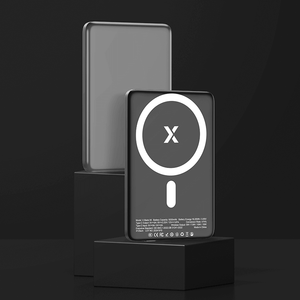
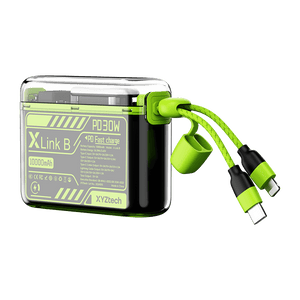
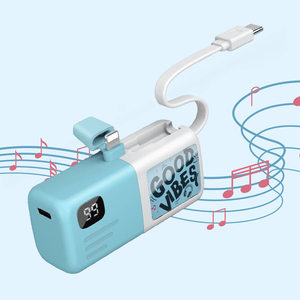
If your battery no longer lasts through the day, a power bank can also be a practical backup while you decide whether battery replacement is worthwhile. XYZtech offers 5,000mAh and 10,000mAh power banks, including wired, wireless, and wired-plus-wireless options, with selected products currently on sale for up to 59% off.
Related Articles
How to Prolong iPhone Battery Life: Top 10 Battery Care Tips
How to Turn Off Optimized Battery Charging | iPhone & Watch
Why Is My iPhone Hot? Causes & Fixes for Overheating Problems


