

Why Is Wireless Charging So Slow? Common Causes and Fixes

You leave your phone on a wireless pad for an hour, come back, and it’s only gone up 10%.
It’s a common frustration that leads to two questions: why is wireless charging so slow, and why are wireless chargers so slow even when they’re labeled “fast”?
The answer isn’t just one thing. Wireless charging is naturally slower, but in everyday use, small details, like heat, placement, compatibility, and even how you use your phone, can quietly slow it down much more than expected.
Whether you’re using an iPhone or an Android device, the experience can feel similar, but small differences in how each device handles wireless charging can affect speed more than expected.
Once you see what’s really happening, it becomes much easier to fix, and avoid repeating the same frustration.
In this blog:
- Why Is Wireless Charging So Slow? Wireless vs. Wired
- Why Are Wireless Chargers So Slow: Common Reasons and How to Fix It
- When Does Wireless Charging Actually Make Sense?
- A Simple Backup When You Need Faster Charging
- When to Consider Professional Help
- Frequently Asked Questions
- So, Why Is Wireless Charging So Slow? A Quick Recap.
Let’s get started!
Why Is Wireless Charging So Slow? Wireless vs. Wired
Wireless charging works by transferring energy through a magnetic field instead of a direct cable connection. That extra step is where the slowdown begins.
Because power isn’t flowing through a physical wire, some of it is lost during transfer, usually around 20–30%. That lost energy doesn’t disappear; it turns into heat.
This is exactly why many people ask why are wireless chargers so slow compared to wired ones. While a cable delivers power directly to your battery, wireless charging has to 'bridge a gap,' and that process isn't perfectly efficient.
Unlike wired charging, which sends power directly into the battery, wireless charging:
- Loses some energy during transfer (as heat)
- Requires precise alignment between coils
- Automatically reduces speed when heat increases
Because of these limitations, wireless charging is naturally less efficient than wired charging, even in ideal conditions.
Wireless Charging vs Wired Charging: What Should You Expect?
Wireless charging focuses on convenience. You can simply place your phone down without plugging anything in, and it reduces wear on charging ports over time.
Wired charging, on the other hand, is still the better choice when speed matters. It delivers power directly, making it far more efficient and significantly faster.
Wireless charging isn't meant for speed; it’s meant for convenience. It’s perfect for your nightstand while you sleep or your desk while you work. But if you’re in a rush and need a 50% boost before heading out, stick to the cable.
Why Are Wireless Chargers So Slow: Common Reasons and How to Fix It
Wireless charging isn’t a direct connection, so small limitations can quickly add up. Here’s how to spot them and what to do.
1. Charger Power and Compatibility Can Quietly Limit Speed
Not all chargers deliver the same performance across devices. Even if the charger supports higher wattage, your phone may limit how much it accepts unless everything matches properly. When there’s a mismatch, it falls back to a slower speed. This is a common reason people still ask why is wireless charging so slow even after upgrading.
iPhones tend to perform best with MagSafe or certified Qi chargers. Android devices vary more, with some requiring specific standards like PPS or updated Qi versions to reach full speed.
To fix this:
- Use a charger designed or certified for your phone
- Pair it with a compatible fast-charging adapter
- Avoid mixing random accessories
2. Your Power Adapter Might Be Holding Everything Back
Your power adapter plays a bigger role than most people expect. You can have a high-quality wireless charger, but if the adapter can’t deliver enough power, or doesn’t support the right protocol, the entire setup slows down.
To get the most out of your setup, keep these tips in mind:
- Match the Wattage: A lot of wireless chargers only deliver 5W to 15W, which is too slow for modern smartphones. Use a sufficiently powerful USB-C PD adapter that matches your charger’s supported input (commonly 20W–30W for most setups) to significantly cut down charging time.
- Check the Protocol: It’s not just about raw power; the adapter must support the right standards, like USB-C Power Delivery (PD) or PPS, to communicate effectively with your device.
- Simplify the Connection: Avoid multi-port adapters that split power between devices, and never plug your pad into a laptop or car USB port. For the best results, plug directly into a wall outlet.
The charging pad is only half the system, without the right adapter feeding it, even the best charger will underperform.
3. Misalignment Between Charger and Phone Reduces Efficiency
Wireless charging depends on two coils lining up perfectly, one inside the charger and one inside your phone. If they’re slightly off, the power transfer becomes inefficient.
This often leads to inconsistent charging, where your phone connects, disconnects, or charges slowly without an obvious warning.
For iPhones with magnetic alignment systems, placement is usually more consistent. Many Android devices, however, still rely on manual positioning unless paired with magnetic accessories, making misalignment a more common issue.
Fixing this is simple but important:
- Center your phone on the pad carefully
- Use stands or magnetic chargers for better positioning
- Avoid placing your phone at an angle
Better alignment leads to more stable and faster charging without changing anything else.
4. Phone Cases Can Block or Weaken Charging
Cases don’t always block charging completely, but they often reduce efficiency.
Thicker materials, built-in magnets, or layered designs can weaken the connection between coils. At the same time, they trap heat, which leads to slower speeds.
This applies to both iPhones and Android devices, although magnetic accessories on some phones can add another layer of interference if not properly aligned.
If charging feels unusually slow:
- Remove the case temporarily and test
- Switch to a thinner case if needed
Even small improvements here can noticeably speed things up. You can learn more here: Does MagSafe Work Through Cases? Find Out the Facts
5. Heat Buildup Slows Charging Over Time
Wireless charging naturally produces more heat than wired charging because of energy loss during transfer. Once your phone gets warm, it automatically reduces charging speed to prevent damage.
This is why sometimes charging might begin at a decent speed, then slowly drop, sometimes cutting power by more than half within minutes. This behavior, called thermal throttling, is one of the biggest hidden reasons behind why is wireless charging so slow during longer charging sessions.
Both iPhones and Android devices use this protective behavior, although the exact thresholds and how quickly speeds drop can vary by brand and model. Learn more here: Wireless Charger Overheat: Can It Explode?
To reduce this:
- Charge in a cool, open space
- Avoid soft surfaces like beds or cushions
- Remove the phone case if it traps heat
- Consider chargers with built-in cooling
Keeping your phone cool doesn’t just help, it allows it to maintain higher speeds for longer.
6. Using Your Phone While Charging "Cancels Out" Progress
Using your phone, especially for demanding tasks like gaming, video calls, or recording, consumes power at the same time it receives it. Since wireless charging is less efficient than a cable, the "incoming" power often struggles to keep up with the "outgoing" drain.
On both iPhone and Android, if you are running a GPS or streaming high-def video, your battery percentage might stay exactly the same for an hour. You aren't "broken"; you are just consuming power as fast as the pad can provide it.
Active use generates heat from the processor. When combined with the heat from the wireless coils, both platforms will "throttle" (intentionally slow down) the charging speed to protect the battery from permanent heat damage.
To fix this:
- Let your phone rest. If you must use it, keep the screen brightness low and avoid high-intensity apps, or stick to light activities like checking a text rather than watching a video.
- Close unnecessary apps
- Use airplane mode when needed
7. Background Apps Drain Power While Charging
Even if the screen is off, your phone may be working hard behind the scenes, quietly draining energy that should be going into your battery.
Both iOS and Android often wait until the phone is on a charger to perform heavy tasks like iCloud/Google Photos backups or system updates. This can lead to a "slow start" where the phone barely charges for the first 20 minutes.
If you have a weak Wi-Fi or Cellular signal, your phone (regardless of brand) boosts power to its antennas to stay connected. This hidden effort consumes significant wattage.
To fix this:
- iPhone: Turn on Low Power Mode in Settings > Battery to pause Background App Refresh and mail fetching.
- Android: Enable Battery Saver or "Background Power Limits" in Device Care to put unused apps to sleep immediately.#
-
For the absolute fastest wireless charge, toggle on Airplane Mode to cut all background radio drain.
8. Software Features Can Intentionally Slow Charging
Modern smartphones include features like adaptive charging, which are designed to
Wireless charging works perfectly overnight since time is not a limitation. You simply place your phone on the pad and wake up with a full battery.
protect battery health, not maximize speed.
These features may:
- Slow charging overnight
- Pause charging at certain levels
- Delay reaching 100% until you need it
iPhones call this “Optimized Battery Charging,” while Android devices use similar features under different names depending on the brand.
This can make charging feel inconsistent or unusually slow.
If needed, check your battery settings and adjust features like optimized or adaptive charging based on your usage.
9. Brand-Specific Behavior and Limitations
Some phones are optimized to work best with their own branded accessories. When paired with third-party chargers, they may reduce charging speed, even if everything seems compatible.
This behavior tends to be more noticeable across different Android brands, though iPhones also perform best within their own accessory ecosystem.
This explains why two devices can perform very differently on the same charger.
If you’ve tried everything else and still see slow speeds, it may be worth testing with an official or fully compatible accessory for your device.
When Does Wireless Charging Actually Make Sense?
If wireless charging is slower and less efficient, why do we use it? It isn’t about speed, it’s about convenience and protecting your phone.
Night Charging
Wireless charging works perfectly overnight since time is not a limitation. You simply place your phone on the pad and wake up with a full battery.
It also:
- Removes the need to plug in cables in the dark
- Reduces charging stress on the battery
- Works well as a bedside alarm setup
Desk Charging
At work or school, wireless charging becomes a passive background process. Every time you place your phone down, it slowly tops up.
Over a full day, this helps maintain a near-full battery without plugging in cables.
Minimalist Setup
Wireless chargers reduce cable clutter and create a cleaner workspace or bedside setup. This is especially useful for users who prefer a simple, organized environment.
Preserving Charging Port Lifespan
Repeated plugging and unplugging causes microscopic wear on charging ports over time.
Wireless charging eliminates:
- Port friction
- Loose cable issues
- Physical connector damage
This helps extend long-term hardware durability.
Universal Charging Convenience
A wireless pad works across both iPhone and Android devices, as long as they support Qi charging.
This makes it ideal for:
- Shared households
- Offices
- Guest-friendly setups
No need to worry about Lightning vs USB-C cables.
On-the-Go Convenience (Magnetic Power Banks)
Magnetic wireless power banks allow charging while using your phone without cables. This is especially useful for travel or commuting.
Safety Features
Most wireless chargers include built-in protection systems that:
- Stop charging if overheating occurs
- Regulate power automatically
- Protect battery health during long sessions
Wireless charging is like a slow-cooker: it’s not for when you’re in a rush, but it’s incredibly convenient when you have the time. If you need a 50% boost before heading out the door, stick to the cable. But for your desk or your bed, the "drop and go" convenience is hard to beat.
A Simple Backup When You Need Faster Charging
Wireless charging is convenient, but there are moments when you need something quicker and more dependable.
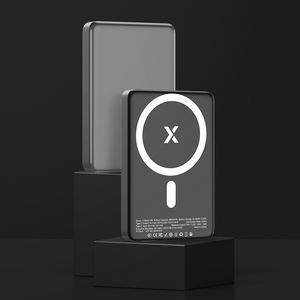
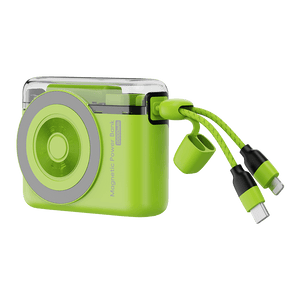
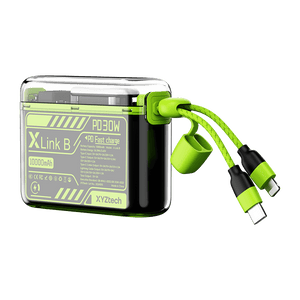
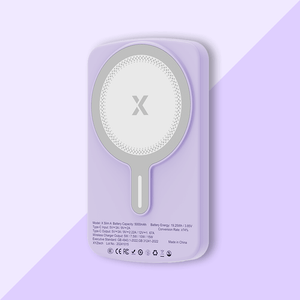
Having a 5000mAh or 10000mAh power bank, either wired or wireless, or both types of charging gives you flexibility. You can switch to wired charging when speed matters, or stay with wireless for convenience when you have time.
It’s a simple way to avoid being stuck waiting when your battery is running low.
When to Consider Professional Help
If your phone still charges extremely slowly, even after trying different chargers, removing the case, and adjusting placement, there could be a deeper issue.
It might be related to the battery, internal charging coil, or software limitations. In these cases, having your device checked by a technician or service center is the safest next step.
Frequently Asked Questions
How to improve wireless charging speed?
Improving charging speed starts with optimizing your setup and environment. Positioning your phone correctly on the pad ensures energy transfers efficiently without interruption. Using a higher-quality charger and removing thick cases can also improve consistency. Keeping your device cool during charging helps maintain stable performance throughout the process.
Is 2 hours fast charging?
Charging duration depends on the technology being used and the power delivered. A two-hour full charge may feel reasonable for wireless charging, but it is slower compared to modern wired solutions. Many wired chargers can reach significant battery levels in under an hour. So while two hours is acceptable, it is not considered fast by current standards.
Should I charge my phone to 90% or 100%?
Battery longevity improves when extreme charge levels are avoided regularly. Keeping your battery within a moderate range reduces stress on internal components. Charging all the way to full occasionally is fine, but doing it constantly may contribute to gradual wear. A balanced approach helps maintain long-term performance.
What is the 20, 40, 80 rule?
This approach focuses on maintaining battery levels within a comfortable range to reduce strain. Instead of allowing the battery to drop too low or stay at maximum for extended periods, charging is done within a controlled window. This helps minimize chemical aging inside the battery. Over time, it supports better efficiency and longer lifespan.
So, Why Is Wireless Charging So Slow? A Quick Recap.
Wireless charging is slower than wired charging because of energy loss, heat buildup, alignment sensitivity, and system limitations like adapters, cases, and background activity. These factors combine to reduce charging speed.
These are also the key reasons behind why are wireless chargers so slow, even when everything seems properly set up.
Key Takeaways
- Wireless charging is naturally slower due to energy loss and heat during transfer
- Poor alignment and thick cases reduce charging efficiency, proper positioning helps
- Low-quality chargers or weak adapters limit maximum charging speed
- Heat buildup triggers automatic throttling, so keeping your phone cool improves performance
- Background apps and software features can silently slow down charging
- Using a properly matched charger setup significantly improves consistency and speed
Wireless charging can’t fully match wired charging in speed, but it becomes much more reliable when these factors are controlled.
For moments when speed matters, having a 5000mAh or 10000mAh power bank with wired charging support gives you a dependable backup. You can switch instantly to a faster charge instead of waiting on a slower wireless setup.
Related Articles
MagSafe vs Lightning vs Qi Charging: Which is Better?
Wireless Charger Overheat: Can It Explode? Causes & Safety Tips


