

MagSafe Slow Charging: Is It Normal or a Problem?

Maybe your MagSafe charger used to charge faster and suddenly became slow. Or perhaps you're using it for the first time and are wondering why your wired charger seems much quicker.
MagSafe slow charging can happen for several reasons, and a faulty charger is only one possibility. Your power adapter, case, temperature, battery level, charging settings, and even what you're doing on your iPhone can affect charging speed.
Before replacing your charger, use the checks below to find out what's actually happening.
In this blog:
- First, Figure Out What “Slow” Means
- MagSafe Charger Slow Charging Common Causes
- Still Getting MagSafe Slow Charging? Try This
- My MagSafe Was Fast Before. Why Is It Slow Now?
- When Should You Suspect a Problem With the Charger?
- Frequently Asked Questions
Let’s get started!
First, Figure Out What “Slow” Means
Not every MagSafe charger slow charging means there's a problem. Your situation usually falls into one of three categories.
1. MagSafe was never as fast as your cable.
This can be normal. Wired and wireless charging work differently, and charging speed depends on the particular iPhone, charger, adapter, and conditions. Apple's MagSafe Charger can provide up to 25W of peak power on certain compatible iPhones with the required adapter, but the iPhone doesn't receive that maximum continuously.
So if your MagSafe charges reasonably well when the phone is cool, uncovered, and connected to a suitable power source, being slower than your cable does not automatically mean something is wrong.
2. Your MagSafe used to charge faster but has become noticeably slower.
This is worth checking. Something may have changed in your setup. You may have switched cases, changed the adapter, started using the charger in your car, or begun charging the phone in a hotter place. Think about what changed around the time you noticed the slowdown.
3. It only becomes slow near 80% or higher.
That can also be normal. iPhone changes how it charges as the battery gets fuller, so the last part of the charge can take longer. Battery-protection features can also affect how the phone charges.
The important question is whether your iPhone is slow throughout the charge or mainly near the top.
MagSafe Charger Slow Charging Common Causes
Here are the most common MagSafe slow charging reasons, along with simple things you can try to fix each one.

1. Your power adapter or USB port may be holding it back
Your MagSafe charger can only use the power it gets from the adapter or USB port. This can be easy to miss if you're using MagSafe with a car USB port, computer, or USB hub. Apple notes that these connections may charge an iPhone more slowly than a dedicated power adapter.
The power adapter also makes a difference. With Apple's current MagSafe Charger, certain compatible iPhones can reach up to 25W of peak wireless charging when used with a suitable 30W or higher power adapter. Older MagSafe chargers have different limits.
Try this: Connect your MagSafe charger to a suitable USB-C wall adapter and another outlet. With Apple's current MagSafe Charger, plug it into power before placing your iPhone on it.
If charging becomes faster: The original adapter, USB port, or power source may not have been providing enough power.
2. Your case may be getting in the way
Your case is one of the easiest things to check because you can test it in seconds. A thick case can put more material between your iPhone and the charger. Apple recommends removing a thick, metal, or battery case if your iPhone is charging slowly. Anything between the phone and charger can also affect wireless charging.
This can happen even if the case is labeled “MagSafe compatible.” The case may attach properly but still affect charging because of its thickness, materials, or design. A wallet, cards, metal accessories, lint, or dirt can cause problems too.
Try this: Remove the case and any wallet or magnetic accessory. Clean the back of your iPhone and the charger, then attach the charger directly to the phone.
If charging becomes faster: The case or another accessory may be causing the slowdown. You can learn more here: Does MagSafe Work Through Cases? Find Out the Facts
3. Your iPhone is getting too hot
If your iPhone feels hot while charging, heat could be the reason. Apple says iPhone can slow down or temporarily stop charging when it gets too warm. This is a built-in safety feature that helps protect the battery.
Heat is more likely when you're charging in a hot car, leaving the phone in direct sunlight, using a thick case, or doing demanding tasks while charging.
Try this: Move the iPhone to a cooler place, keep it away from direct sunlight, and remove the case temporarily if it traps heat. Apple recommends using iPhone in temperatures between 0°C and 35°C (32°F and 95°F).
If charging improves after it cools down: Heat was likely affecting the charging speed. You can learn more here: MagSafe Charger Overheating: What’s Normal and When to Worry
4. You're using the iPhone while it's charging
Your iPhone continues to use power while it is charging. Gaming, navigation, using the camera, streaming video, and other demanding activities can use a lot of power. As a result, the battery may increase more slowly because some of the incoming power is being used right away. This can even make it look like the battery is barely increasing or dropping while connected to MagSafe.
Try this: Lock the screen and stop demanding apps for 20–30 minutes. Then check the battery percentage again.
If it charges faster: Your iPhone was using a lot of the incoming power while you were using it.
5. Your iPhone is intentionally slowing the charge
Not every slow charge means there's a problem. iPhone can reduce charging speed as the battery gets closer to full. Optimized Battery Charging can also pause charging around 80% and finish later based on your usual routine. On iPhone 15 and later, a Charge Limit can also stop charging at a selected percentage.
So if your iPhone charges quickly at first and then seems much slower near 80% or higher, that can be normal.
Try this: Go to Settings > Battery and check the charging information, battery limit, and any messages about charging.
You don't necessarily need to turn these features off. They're designed to help reduce battery wear over time.
6. Your charger simply has a lower charging limit
Not every magnetic charger charges at the same speed. How fast your iPhone charges depends on your iPhone model, the MagSafe charger, the power adapter, and the current conditions. A charger advertised as 15W or 25W does not mean your iPhone will receive that amount for the entire charging session.
This is especially important with third-party chargers. A charger may attach to your iPhone magnetically but still support a lower charging speed or a different wireless-charging standard.
Try this: Check the specifications of your iPhone, MagSafe charger, and power adapter together. Don't look at the wattage of the charger alone.
Still Getting MagSafe Slow Charging? Try This
You don't need special equipment to troubleshoot MagSafe charger slow charging. Start with the iPhone at a relatively low battery level, then:
- Remove the case.
- Disconnect wired accessories.
- Connect MagSafe to a suitable wall adapter.
- Make sure the phone is cool.
- Lock the screen.
- Let it charge for 20–30 minutes.
Then check the battery percentage. If it charges faster, add things back one at a time. Put the case back on and test again. Try your usual adapter. Test the setup in your car. Changing one thing at a time makes it much easier to find the cause.
My MagSafe Was Fast Before. Why Is It Slow Now?
MagSafe charger slow charging can be frustrating because you already know how your charger normally performs. Instead of assuming the charger suddenly went bad, think about what changed.
Maybe you:
- switched to a thicker case
- started using a magnetic wallet
- changed the power adapter
- moved the charger to your car
- started charging in a hotter location
- began using the phone more while charging
- started noticing the slowdown mainly after 80%
Now try to recreate the conditions when it charged normally.
-
Remove the case → use a suitable wall adapter → cool the phone → disconnect accessories → lock the screen.
If charging becomes faster again, the charger may not be the problem. Something in the setup changed.
When Should You Suspect a Problem With the Charger?
You've probably eliminated the easy explanations when all of these are true:
- The iPhone is cool.
- You're charging without a case.
- No wallet or other accessory is attached.
- You're using an appropriate power adapter.
- You're not heavily using the phone.
- You've tried another outlet.
- The charging problem continues from a relatively low battery level.
At that point, try another MagSafe charger if one is available. If another charger works normally, your original charger or power source may be the problem. If several known-good MagSafe chargers behave the same way while wired charging works normally, it may be worth contacting Apple Support.
Frequently Asked Questions
Why is my MagSafe slow only in my car?
If MagSafe is fine at home but slow in your car, the car setup deserves its own test.
The vehicle's USB port may provide less power than a dedicated adapter, while heat from the car can also cause iPhone to reduce charging speed. Apple specifically notes that car USB ports may charge more slowly.
Take the same iPhone and charger indoors and connect them to a suitable wall adapter. If the phone charges normally there, the problem is more likely the car's USB port, charging accessory, or temperature than the iPhone itself.
Does MagSafe get weaker over time?
If you're asking because your charger no longer feels as secure, don't assume the magnets have simply worn out.
First check the physical connection. Lint, dirt, a worn case, an accessory, or physical damage can make the connection feel weaker. A weaker connection can matter if the phone no longer stays properly positioned on the charging area.
Why does MagSafe slow down after 80%?
iPhone normally changes its charging speed as the battery gets closer to full. Optimized Battery Charging and Charge Limit settings can also affect charging around this point, so slower charging after 80% does not automatically mean your charger is faulty.
Can my iPhone lose battery while connected to MagSafe?
Yes. If the iPhone is using power as quickly as, or faster than, the charger is providing it, the battery may rise very slowly or even drop. Heavy app use, heat, and a weaker power source can all contribute to this.
MagSafe Slow Charging: Short Recap
MagSafe slow charging does not automatically mean your charger or iPhone is broken. Start by checking the power source, case, temperature, phone usage, and battery settings before assuming there's a hardware problem.
Key Takeaways
- MagSafe can be slower than wired charging and still work normally.
- Charging usually becomes slower as the battery gets closer to full.
- Heat can cause iPhone to slow or pause charging.
- Cases, wallets, accessories, and debris can interfere with wireless charging.
- The power adapter and USB port can affect charging speed.
- If slow charging continues across different setups, further testing may be needed.
Before replacing your charger, start with the simple checks: remove the case, cool the phone, use a suitable power source, disconnect accessories, and let the iPhone charge without heavy use. These steps can often show whether the problem is with your setup or something that needs further attention.
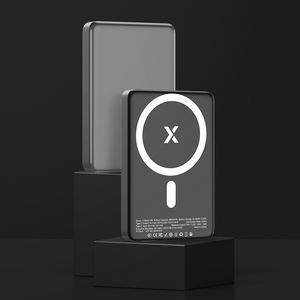
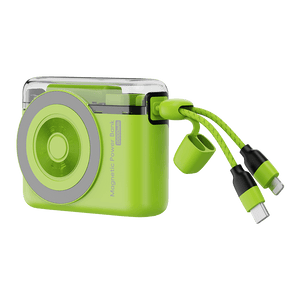
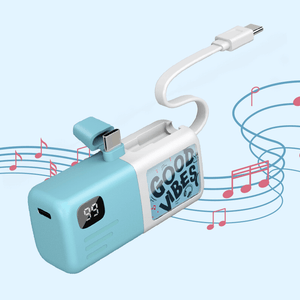
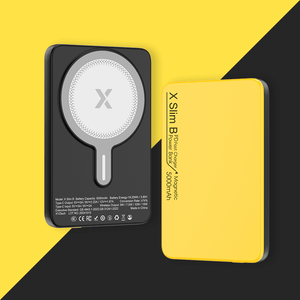
And when you need backup power away from a wall outlet, a power bank can be a useful addition to your charging setup. XYZtech offers 5,000 mAh and 10,000 mAh power banks in wired, wireless, and wired-plus-wireless options, with current deals of up to 59% off.
Related Articles
MagSafe Charger Not Working? Why It Happens and How to Fix It
Is MagSafe Safe? Battery Health, Heat, Magnets, & Charging Truth
iPhone Is Not Charging? Common Reasons & Easy Solutions


